
Download Windows Live Essentials – free, Windows, PC, productivity, communication, photo editing, email, blogging, video editing, family safety, tool, utility, smartphone
Overview
Windows Live Essentials 2012 is a free suite of applications designed to enhance the functionality of Windows PCs by providing users with essential tools for communication, content creation, and digital organization. The suite was developed by Microsoft and released in April 2012, aiming to streamline everyday digital tasks through integrated, user-friendly software. It addresses the growing need for seamless communication, efficient email management, and intuitive media handling—key components in both personal and professional digital workflows.
Target users include home users, students, and professionals who rely on their PCs for managing personal content, staying connected with others, and publishing digital work. The suite supports real-world use cases such as sharing family photos via email or online platforms, creating blog posts from written notes, organizing digital memories with photo tagging, and setting up parental controls to monitor online activity. These tools collectively help users maintain a cohesive digital presence across multiple platforms, including web services and mobile devices.
Although the developer did not provide additional technical details about the suite’s architecture or backend integration, its design reflects Microsoft’s focus on ecosystem cohesion during the early 2010s. Windows Live Essentials remains a notable part of the productivity software landscape, offering a centralized approach to managing digital life on Windows systems. Its inclusion of tools like photo editing, email, blogging, and family safety underscores its role as a foundational utility suite for Windows users.
Key Features & Functionality
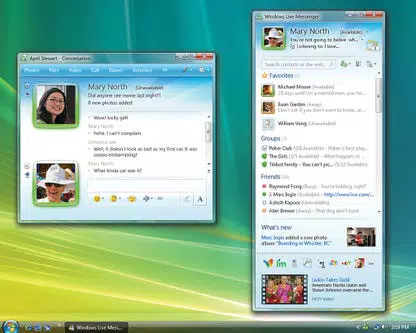
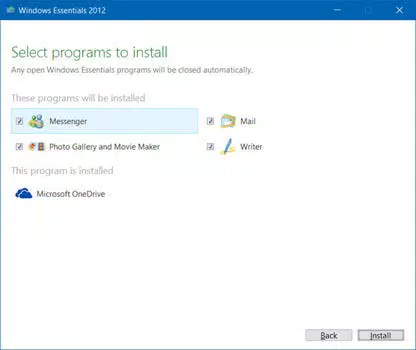
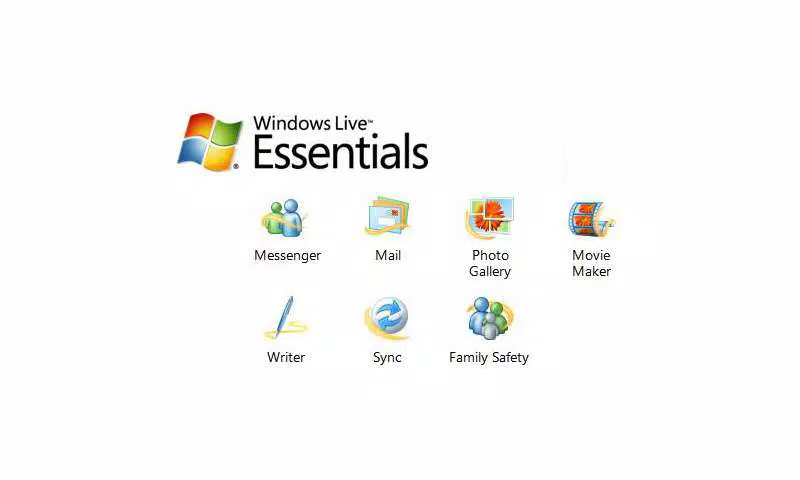
- Windows Live Messenger – Enables real-time communication through text, voice, and video chat, allowing users to stay connected with friends and family across devices.
- Windows Live Photo Gallery – Offers a streamlined interface for organizing, editing, and sharing digital photos, including basic enhancements like cropping, red-eye removal, and color correction.
- Windows Live Mail – Supports multiple email accounts, calendars, and contact management, providing a centralized hub for personal and professional correspondence.
- Windows Live Writer – A desktop application for composing and publishing blog entries directly to popular platforms like WordPress and Blogger, with rich text formatting and media embedding.
- Windows Live Movie Maker (beta) – Allows users to edit home videos by trimming clips, adding transitions, background music, and basic visual effects.
- Windows Live Family Safety – Provides parental controls to monitor and restrict online activity, including web filtering and time limits for children’s device use.
- Windows Live Toolbar – Delivers quick access to Windows Live services and web search functionality from within the browser.
Each application within the suite serves a distinct purpose while maintaining a consistent interface style. For example, users can import photos into the Photo Gallery, edit them with built-in tools, and then publish them directly via Messenger or share them through a blog using Writer. Similarly, a parent can use Family Safety to set daily screen time limits while monitoring visited websites, ensuring a safer online environment for children.
Interface, UX & Performance
The user interface of Windows Live Essentials is characterized by a clean, minimalist design consistent with Microsoft’s Windows 7-era aesthetic. Navigation is intuitive, with clearly labeled icons and menu structures that reduce the learning curve for new users. The suite’s applications share a common visual language, contributing to a cohesive experience across different tools.
Interactions are generally responsive, with fast load times for common tasks such as opening photo albums or composing emails. Although the developer did not list formal performance metrics, the applications perform reliably on mid-range Windows systems from the early 2010s. The suite remains stable during typical usage, with minimal crashes reported during its active support period.
However, due to its age and lack of modern updates, compatibility with newer Windows versions may be limited. The suite was not designed for touch-based interfaces, which may affect usability on modern hybrid devices. Performance on low-end hardware may vary, but no specific requirements were listed. Overall, the UX remains functional for users still operating on supported legacy systems.
Platform Compatibility & Technical Requirements
Windows Live Essentials 2012 is designed exclusively for the Windows operating system. It supports Windows 7 and later versions, though specific compatibility details were not fully disclosed by the developer. The application package has a file size of 180.0 MB, making it relatively lightweight for its time.
Although the developer did not specify minimum OS requirements or hardware specifications, the suite was optimized for desktop environments and does not include mobile versions. It is not available on iOS, Android, or other platforms. Users should ensure their system meets the baseline requirements of the targeted Windows version for stable operation.
Given the release date of 2012, the suite is no longer actively maintained. As such, it may not function properly on modern Windows 10 or Windows 11 systems without compatibility mode or third-party patches.
Pros and Cons
Pros
- Free to download and install, offering high-value tools at no cost.
- Comprehensive suite covering communication, photo editing, email, blogging, and parental controls.
- Consistent interface across all applications improves usability and reduces cognitive load.
- Lightweight file size (180.0 MB) for a full productivity suite.
- Integrates well with existing Windows features and web services.
Cons
- Released in 2012; no longer supported or updated by Microsoft.
- Not compatible with modern Windows versions without compatibility mode.
- Lacks mobile or cross-platform availability.
- Does not support touch-based interactions or modern UI standards.
- Security updates are no longer issued, posing potential risks for users on outdated systems.
FAQ
Is Windows Live Essentials free to download?
Yes, Windows Live Essentials is available at no cost. It was released as a free toolset by Microsoft to enhance the Windows PC experience.
Can I install Windows Live Essentials on Windows 10 or Windows 11?
While the suite was originally designed for Windows 7 and earlier, it may run on Windows 10 or Windows 11 using compatibility mode. However, official support and updates are no longer available.
Does Windows Live Essentials include mobile apps?
No, the suite is desktop-only and does not include mobile applications for Android or iOS devices.
Are the applications in the suite secure?
As the suite is no longer updated, it does not receive security patches. Users should exercise caution when using it on systems connected to the internet.
Can I still update Windows Live Essentials?
No, Microsoft has discontinued updates for Windows Live Essentials. The last version was released in 2012 and remains unchanged.
Final Thoughts
Windows Live Essentials 2012 remains a significant milestone in Microsoft’s history of providing accessible productivity tools for Windows users. Though outdated, it once offered a robust, integrated solution for managing digital content, communication, and family safety. Its legacy lives on in the modern tools that succeeded it, such as Outlook, OneDrive, and Microsoft Family Safety.
For users still operating on legacy systems or seeking a lightweight, free desktop suite, Windows Live Essentials may still serve basic needs. However, its lack of updates and compatibility issues with current operating systems limit its practicality for most modern users.
Download Windows Live Essentials now


